
OCR or PDF editing? Choose the right tool for a scanned PDF
A searchable scan is not the same as editable page text. Learn when to use OCR, edit existing words or convert a scanned PDF to Word.

In this article
You can search for a name in a scanned PDF, yet clicking the name does not let you change it. This is not necessarily a fault: the page may contain a photograph of the text plus an invisible layer used for search.
OCR recognizes words; editing changes the document. Choose Edit scanned PDF when you need to change visible content. Choose OCR when your immediate goal is to extract, search or copy words from an image-only page.
Three page types to distinguish
| Page type | What may work already | What still needs attention |
|---|---|---|
| Native text | Selection, search and text editing | Encoding, fonts and layout |
| Image-only scan | Viewing and printing | Recognizing words before text-based tasks |
| Scan with a text layer | Search and copying | Recognition errors and the visible image |
Try selecting one word and searching for a clear word from the page. A failed test is a clue, not a complete diagnosis: permissions, outlined characters or damaged text encoding can also affect extraction. A long file can contain all three page types.
If you need to copy or search
Use OCR when the page lacks extractable text. Review a small sample first, especially names, dates and numbers. Adobe's recognition guide explains how scanned pages can gain searchable text.
GenPDF asks for consent before server processing of scanned page images. Read that notice before continuing; this workflow differs from local editing of existing PDF text. Check the current limits on the pricing page.
After saving, reopen the result. Search for a word from the processed page, then paste a sentence into a plain-text editor. Confirm spaces and reading order rather than checking only that some text was found.
If you need to change a visible word
Recognition is a starting point. The editor must also replace the visible content and render the new text in the available space. A scan does not contain the original font file, so do not expect OCR to recover an exact typeface.
Work on a copy and test one short edit. Inspect the background around the replacement, the baseline, word spacing and the surrounding line. A coloured page or a textured scan can make a replacement more noticeable than a plain white page.
For native text whose font changes, use the same-font troubleshooting guide instead. The cause and repair path may be entirely different.
If you need a Word document
Decide whether you need editable words or a visual copy. Page images can place the scan into Word without rebuilding text. Editable export requires usable recognized text and further layout reconstruction.
Review tables independently. Reading “12” correctly does not establish which column it belongs to. The PDF-to-Word table guide gives a cell-by-cell check, while flowing versus positioned text helps with longer rewrites.
Worked example: a scanned delivery note
Picture a one-page delivery note from an invented firm, Harbor Supplies, at example.com. It was scanned on an office machine. You open it, press Ctrl+F and type "pallet". Nothing is found. That suggests the page is an image with no text layer.
You have two goals. First, you want to paste the order number into an email. That is a copy goal, so use OCR and check the pasted number against the page. Second, you want to change "12 pallets" to "14 pallets" on the note itself. That is an editing goal: the words must be read first, then the visible ones replaced, and you inspect the paper texture around the new text.
Both goals can apply to the same page. Doing them in order saves effort: recognise, review, then edit.
Check it yourself
- Search for a word you can see. Found: the page has text. Not found: it may be an image.
- Try to select a line. A highlight that follows the letters suggests text. A box over the whole page suggests an image.
- Copy a sentence into a text editor and read it. OCR mistakes (0 and O, 1 and l, rn and m) show up quickly.
- Compare every number on the page with the pasted text. Do not trust a number you have not compared.
- Open the saved copy in a second reader and search again.
Limits
- Recognition depends on the scan. Skewed, blurry or low-contrast pages give more errors.
- Handwriting and unusual typefaces may not be read well.
- The original font is not recovered; edits use an available font.
- Scanned pages have a daily allowance on every plan.
- Tables, columns and mixed languages need extra review.
Do not use OCR as a universal repair button
If a native PDF already contains accurate text, recognizing the whole page again can add another source of errors. If a scan already has a useful text layer, inspect it before replacing it. If the page is blurry, try obtaining a clearer original rather than expecting recognition to recreate missing detail.
Finally, searchability does not prove accessibility, correct reading order or support for in-place translation. Each of those has its own requirements and should be checked for the intended use.
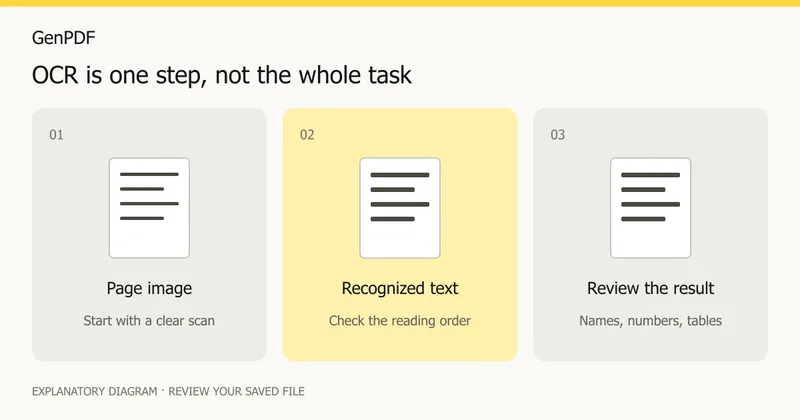
Prepared on 16 October 2026 from current product documentation and the linked Adobe reference. The diagram is explanatory; no new OCR accuracy test or external document processing was performed for this guide. Written with AI assistance.
When the document is a form
If your goal is to preserve completed fields rather than recognize a scan, see when to flatten a PDF form and when to keep it editable. Keep the editable original and inspect a saved copy before sharing.
Frequently asked questions
Why can I search my scan but not edit its visible words?
The PDF may contain a hidden text layer over a page image. Searching uses that text, while the visible words remain part of the image.
Does OCR recover the original font?
No. OCR recognizes characters from an image. Matching or replacing their appearance is a separate editing task.
Will OCR make a table fully editable?
Not by itself. Reading the words and reconstructing table cells are separate steps. Check row and column relationships after conversion.
Is OCR free?
The free plan has a daily allowance of 5 scanned pages, and paid plans read up to 100 pages a day. The pricing page has the current figures.
Are my scanned pages uploaded?
Scanned pages are sent as images for reading only after you agree in a consent notice. Read it before you continue.


