
Edit Arabic text in a PDF: joined letters, right to left

Change Arabic words in a PDF and they stay Arabic: letters joined, the line running right to left, in the document's own font when the PDF contains its letters. The words you don't touch are left as they were. Scanned Arabic pages too. Free, in your browser.

or drop it here
  • Runs in your browser
  • Free, no account needed
  • Works on phones

How it works

How to edit an Arabic PDF

  1. 01

    Choose your PDF. It opens in the editor, in your browser.

  2. 02

    Click the Arabic line you want to change and type, right to left.

  3. 03

    Download the PDF: the new words are real Arabic text that can be searched and copied.

A real example: adding a sentence to a lease

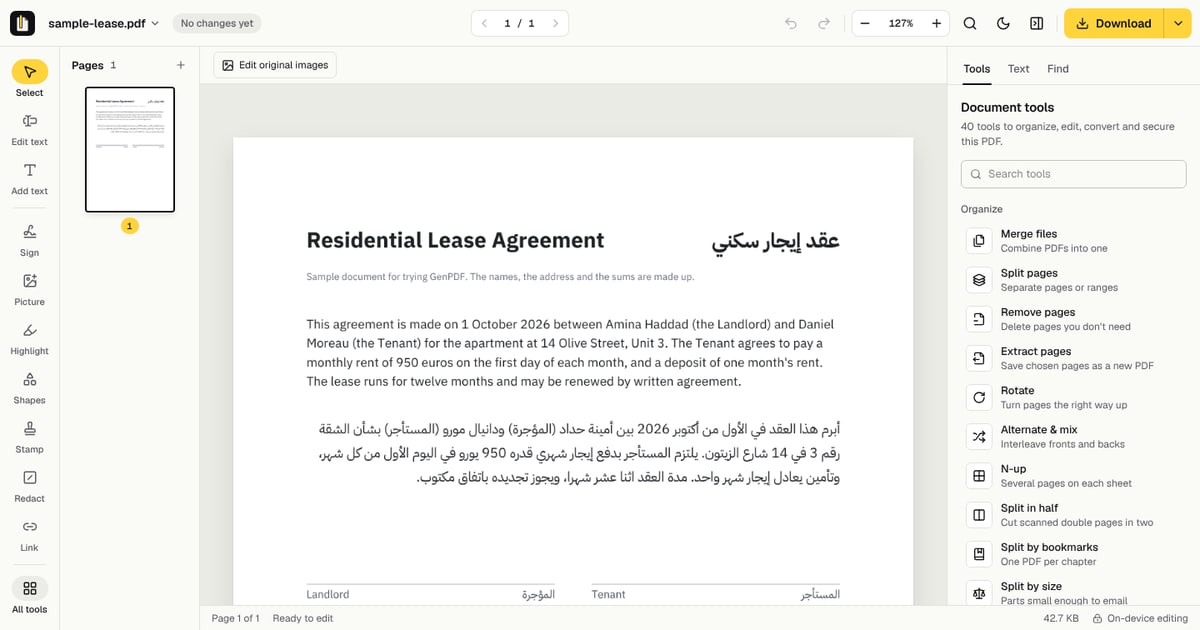
A residential lease open in the GenPDF editor; its Arabic paragraph ends with “باتفاق مكتوب”.
Before: a lease with Arabic, English and numbers.
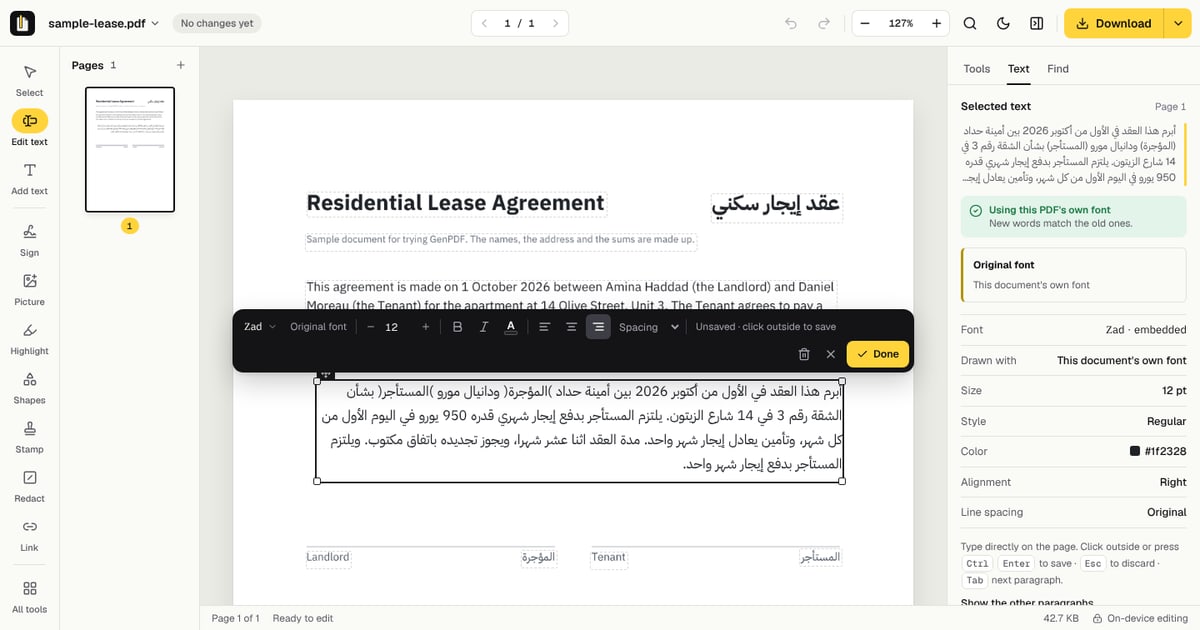
The Arabic paragraph open for editing with a new sentence at its end; the side panel says this PDF's own font (Zad) is used.
While editing: the new sentence is typed in the file's own font, and the editor names that font.
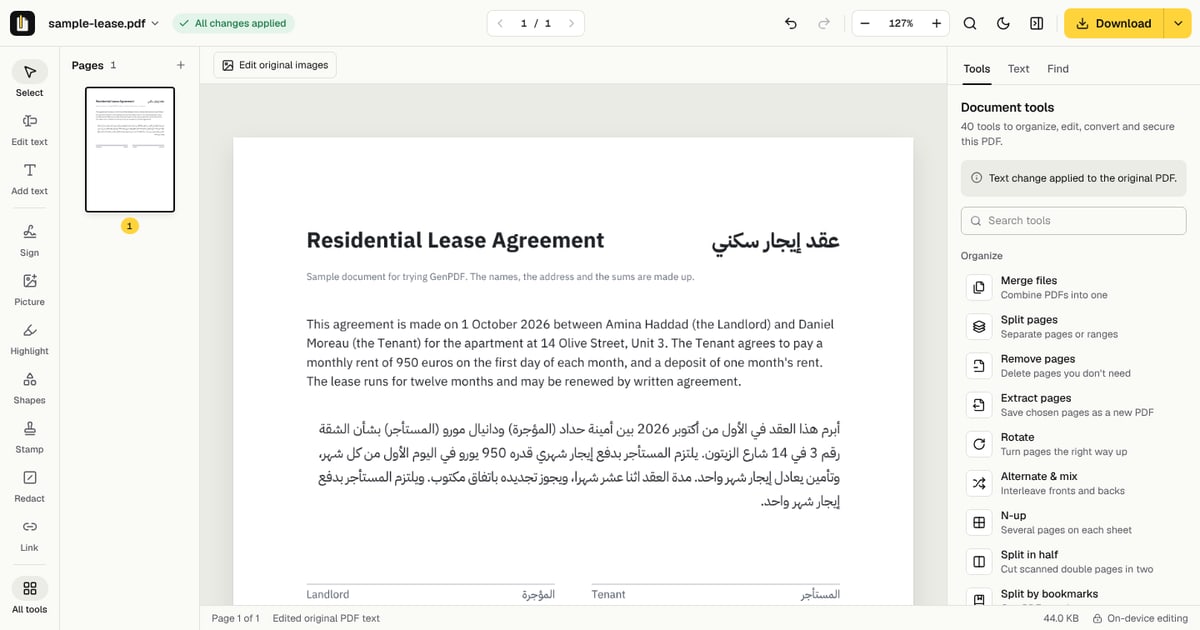
The page after the edit is applied: the Arabic paragraph ends with the new sentence “ويلتزم المستأجر بدفع إيجار شهر واحد”.
After saving: the sentence is part of the page's text, its letters joined.

In detail

Editing Arabic in a PDF without breaking it

What goes wrong in most PDF editors

Arabic letters change shape with their neighbours, and a line runs from right to left, with numbers and Latin words keeping their own direction inside it. A PDF editor that writes characters one at a time, unjoined and left to right, turns a word into separate letters or into its mirror image.

The reverse problem exists too: some Arabic PDFs store their letters so that copying them gives nonsense. In both cases the text looks wrong, or cannot be changed at all, in an editor that was built for Latin letters.

How GenPDF writes Arabic

GenPDF shapes each word as Arabic is written: letters take their joined forms and the line is set right to left, with digits and Latin words in their own direction. It uses the document's own font when the PDF contains the letters, so an edited word matches the words around it.

When a PDF stores unreadable characters for one of its fonts, GenPDF recovers the text, so it can be read, searched and edited, and tells you that it did. If the embedded font lacks a letter you type, that letter is drawn with a matching Arabic font and you are told which.

Scans, Word and mixed languages

A scanned Arabic page is first read, which needs your agreement: the page's image goes to our server, is read, and is deleted as soon as the text is back. Then its lines can be edited like typed text.

A line can mix Arabic, numbers and French or English words. Each part keeps its direction, as in a document typed in Word. And PDF to Word marks Arabic paragraphs as right to left, so they read in order in the .docx.

Where it stops

Good to know before you start:

  • Reading a scan is best on clear, straight pages. Handwriting is not reliably read, and turned text is left out.
  • A decorative font that the PDF does not contain is replaced by the closest font GenPDF has, and its name is shown before you save.
  • A PDF of more than 25 MB does not open in the editor, and a password-protected one has to be unlocked first.
  • Editing runs in your browser, so the PDF is not uploaded to change its words.

Why GenPDF

Edit an Arabic PDF with GenPDF: what is different

Letters joined, in the right order

Each letter takes its joined form and the line reads right to left, in the PDF and in every program that opens it, with numbers and Latin words in place.

The words you keep, kept

Only the words you change are rewritten. The others stay the very same glyphs, so the line keeps the look the document was made with.

Scans and Word files too

A scanned Arabic page can be read and then edited, and PDF to Word gives you a document where Arabic reads in order.

Questions

Edit an Arabic PDF: questions and answers

Why does Arabic text look broken or reversed in a PDF?

Because most editors are built for Latin letters. Arabic letters change shape with their neighbours and the line runs right to left: written one letter at a time, unjoined and left to right, a word falls apart or comes out reversed. GenPDF shapes each word as Arabic is written, in the document's own font when the PDF contains its letters.

Can I edit a scanned Arabic document?

Yes, after you agree to have it read. GenPDF reads the scanned page, Arabic included, and you edit its text like any other line. The page's image is sent to our server to be read, then deleted. To only copy the text, use OCR.

Can I mix Arabic, numbers and English in one line?

Yes. Numbers and Latin words keep their own direction inside the Arabic line, as in a document typed in Word.

Is it free?

Yes, with no account: editing is free, and the free plan includes 3 edited-PDF downloads a day; Pro or a 7-day pass has no limit.

Why does Arabic copied from a PDF come out backwards or unjoined?

A PDF stores the shapes it draws, not always the words in reading order. A program that copies them as they come reverses or separates the letters. GenPDF reads the text back into reading order so you can search, copy and edit it.

Does the new text use the same Arabic font as the old?

Yes, when the PDF contains that font's letters. If it does not, GenPDF picks the closest font, shows its name before you save, and draws only the missing letters with another.

Can I edit a PDF in Arabic and English, or Arabic and French?

Yes. Each line is edited in its own direction, so an Arabic line and an English or French line on the same page both stay correct, and numbers keep their direction.

Can I add new Arabic words, not only change the ones there?

Yes. To write anywhere on the page, use Add text: Arabic letters join and the line runs right to left, in the document's font or another, and you can move and resize the box.

Blog

Articles about this tool

Comparisons

6 PDF editors compared for Arabic documents

Compare six PDF editors for Arabic text, forms, signatures and Word export. Check free limits, pricing and the sources behind each comparison.

7 min read

Edit an Arabic PDF: free, no account