
iLovePDF alternative for editing Arabic PDF text
Looking for an iLovePDF alternative for Arabic text? Compare GenPDF’s editing tools, right-to-left support, free limits and pricing with iLovePDF.

In this article
Looking for an iLovePDF alternative to change Arabic text already in a PDF? Start with right-to-left text support. iLovePDF’s Arabic editor page publishes a limitation; we tested GenPDF’s Arabic PDF editor on a sample lease. Here are the documented differences, the result of that test and the steps to try your own file.
Facts checked on 15 October 2026. Next check: 15 January 2027. For a comparison with other tools, read PDF editors compared for Arabic.
What iLovePDF offers
iLovePDF is a site with an Arabic interface and many tools. Its pages list merge, split, compress, conversion between PDF and Word, PowerPoint, Excel and PDF/A, OCR, edit, sign, redact, compare and translate. Its menu also lists a desktop app for Mac and Windows and a phone app for iOS and Android. These are real strengths, and GenPDF does not offer some of them.
On prices, here is what its pricing page shows on 15 October 2026: a free Basic plan with "Limited document processing", and a Premium plan at $5 a month billed annually ($60 a year) or $9 billed monthly. Prices sometimes differ by country.
Arabic interface versus Arabic text editing
The English Edit PDF page describes the tool as editing a PDF "by adding text, shapes, comments and highlights", and says: "Select text to edit, move, or delete the existing content." The Arabic Edit PDF page carries a notice below that part. Here is our translation of the Arabic:
The content editor does not currently support right-to-left (RTL) languages. If you upload a document in an RTL language, your changes may not be applied correctly.
We did not find this notice in the text of the English page we received. It is on the Arabic page, and it is addressed to you if your file is Arabic and you want to change text already in it. We do not know how the tool treats your file, because we did not test it. If you want to use it, try a copy of the file and check whether the letters stay joined and which way the line runs before you accept the result.
A quick comparison with GenPDF
| iLovePDF (according to its pages) | GenPDF | |
|---|---|---|
| Arabic interface | Yes | Yes |
| Editing existing Arabic text | The notice on the Arabic page above. Not tested by us | We tested it: the letters stayed joined |
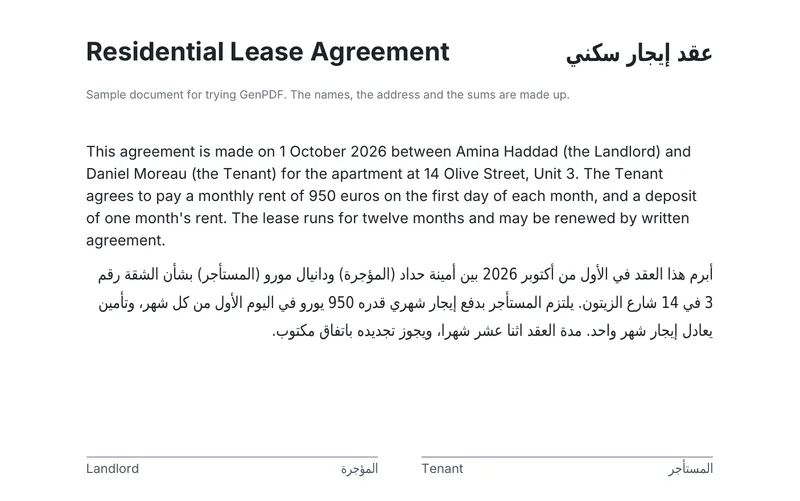
| PDF to Word | Available. We did not test it with Arabic | Available, with Arabic paragraphs set right to left |
| PDF to PowerPoint, Excel and PDF/A | Available | Not available |
| Desktop and phone apps | Available | Not available. It runs in the browser |
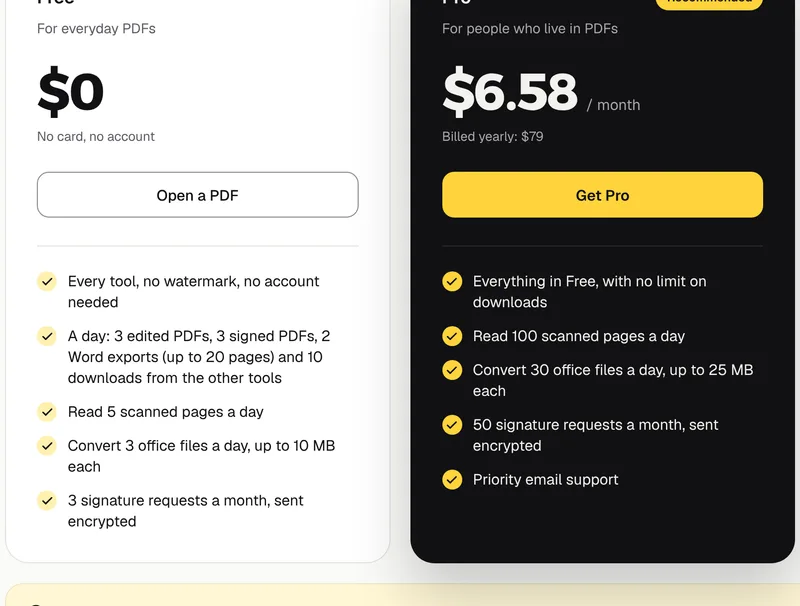
| Free limit | "Limited document processing" | No account and no watermark; 3 edited PDFs a day |
| Lowest paid price | $5 a month billed annually | $79 a year ($6.58 a month) |
How to edit an Arabic paragraph in GenPDF
We used a sample lease with an Arabic paragraph and invented names and amounts.
1. Open the file
Open your file in GenPDF, or click Try a sample. The pages of the file appear as thumbnails in a side panel. The file is not uploaded to be edited: the editing happens in your browser.
2. Change the Arabic paragraph
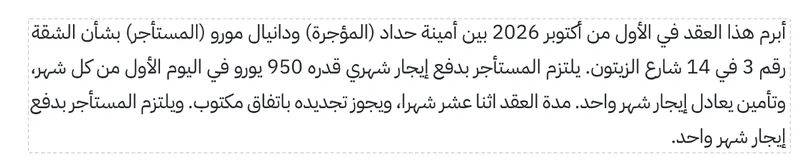
Choose Edit text, click the Arabic paragraph and type. The letters stay joined and the line stays right to left. We added a sentence at the end of the paragraph.

3. Click Done, then download
Click Done and the message All changes applied appears. Then click Download.
If you want the file in Word, read how to convert an Arabic PDF to Word. The next picture shows the Word file made from the same lease.
If your file is scanned, it has to be read first, which is covered in OCR PDF. For the reasons letters split apart in many editors, read why Arabic letters break when editing a PDF. To get from PDF to Word and edit the text there, see the PDF to Word tool.
Features and limits to compare
- Fewer tools. There is no PDF to PowerPoint, Excel or PDF/A.
- Web app rather than a native app. Use GenPDF in your browser without a separate installer.
- Daily limits. The free plan includes 3 edited PDFs, 3 signed PDFs and 2 Word exports a day, up to 20 pages each. The rest is on the pricing page.
- Page content does not reflow automatically. Longer text may overlap nearby content. Check the page layout after editing.
- No digital-certificate signature. Its signature is a simple electronic one. If you are comparing it with Acrobat, read the Adobe Acrobat alternative for Arabic PDFs.
How this guide was written
We tested GenPDF on 15 October 2026 on its production build, in Chromium, on a sample lease. On the same day we read the two iLovePDF pages linked above and its pricing page. We uploaded no file to its site and did not test its tools. An AI tool helped draft the text. The Arabic version of this guide was written first.
Frequently asked questions
Does iLovePDF edit Arabic text?
The Arabic Edit PDF page on iLovePDF carries a notice about the content editor. It says the editor does not currently support right-to-left languages and that changes may not apply correctly to a document in such a language. We did not test iLovePDF ourselves, so try a copy of your file first.
What is an iLovePDF alternative that keeps Arabic letters joined?
We tested GenPDF on a file with an Arabic paragraph. After we added a sentence, the letters stayed joined and the line stayed right to left. That does not make it the right choice for every file, so try yours before you rely on it.
Is iLovePDF free?
Yes, with the free Basic plan, which its pricing page describes as limited document processing. On 15 October 2026 the page also showed a Premium plan at $5 a month billed annually ($60 a year), or $9 billed monthly.
Does iLovePDF work in Arabic?
Yes, the iLovePDF site has an Arabic interface, and its Arabic Edit PDF page is set right to left. The notice mentioned above concerns editing the existing text of documents written in right-to-left languages.
Which iLovePDF tools does GenPDF not have?
iLovePDF's pages list PDF to PowerPoint, PDF to Excel and PDF to PDF/A, HTML to PDF, a desktop app and a phone app. GenPDF does not provide those conversions or native apps; it runs as a web app in the browser.


