
6 PDF editors compared for Arabic documents
Compare six PDF editors for Arabic text, forms, signatures and Word export. Check free limits, pricing and the sources behind each comparison.

In this article
An Arabic interface does not necessarily mean an editor can change existing Arabic text correctly. This comparison looks at six PDF tools, covering text editing, fonts, signatures, free limits and pricing. We are the GenPDF team: we tested our Arabic PDF editor and researched the other services through their official documentation.
Choose by task: changing a paragraph, obtaining a certificate-based signature and redesigning a document call for different capabilities. The tables separate our GenPDF test results from the features other providers describe.
Facts checked on 15 October 2026. Next check: 15 January 2027.
What matters for Arabic when you pick an editor
Arabic has needs that Latin languages do not. Ask about these before you upload a file to any tool.
- Joined letters. An Arabic letter changes shape with its place in the word. An editor that does not shape the word writes separate letters. See why Arabic letters break when editing a PDF.
- Line direction. An Arabic line reads right to left, while numbers and Latin words stay left to right. An editor that gets this wrong mirrors the words.
- Fonts. The font inside the file may lack the letter you type. A good editor picks a close font and tells you which.
- OCR. A scanned page is a picture with no text, and it has to be read first. See OCR PDF.
- Export to Word. The Arabic paragraphs must be saved as right-to-left in the Word file or they come out mirrored. See how to convert an Arabic PDF to Word.
- Privacy. Some tools work in your browser and others upload the file to a server. Know which before you edit a contract or a personal document.
- Price. Look at the free limit, the lowest paid price and the billing period.
Editing existing text: what each tool's page says
This table gives what each tool's pages say on 15 October 2026. The only tool we tested is GenPDF.
| Tool | What its page says about editing existing text | Arabic |
|---|---|---|
| GenPDF | Edits existing text in the browser with no account. We tested this ourselves. | In our test the letters stayed joined and the line ran right to left. |
| iLovePDF | Its Edit PDF page says: "Select text to edit, move, or delete the existing content." | Its Arabic Edit PDF page carries a notice (our translation): "The content editor does not currently support right-to-left (RTL) languages. If you upload a document in an RTL language, your changes may not be applied correctly." |
| Smallpdf | Its Edit PDF page says direct text editing needs a Pro subscription, with a 7-day trial. | An Arabic interface exists. The page says nothing about editing Arabic text. |
| PDF24 | Its page describes writing on PDF pages and inserting images and shapes, and its tip is to convert a PDF to Word to edit the text. | An Arabic interface exists, set right to left. |
| Adobe Acrobat | Adobe's free online editor page in its US version says the free version does not edit existing text. The pages differ by country. | Adobe's language support page says Acrobat supports Arabic and Hebrew on Windows. |
| Canva | Canva's help page says Canva splits a PDF into editable elements and may replace fonts it does not support. | The page says nothing about Arabic or text direction. |
Free limits and prices
Prices are in US dollars as we saw them on 15 October 2026. They can differ by country and billing period, so check the page before you pay.
| Tool | Free limit | Lowest paid price the page shows |
|---|---|---|
| GenPDF | No account and no watermark; 3 edited PDFs a day | Pro at $79 a year ($6.58 a month); a 7-day pass at $4.99. See pricing. |
| iLovePDF | The free Basic plan: "Limited document processing" | Premium at $5 a month billed annually ($60 a year), or $9 billed monthly. See its pricing page. |
| Smallpdf | A free plan with limited downloads | We print no price: the page loads it after opening and it varies with the billing period. See its pricing page. |
| PDF24 | The page says it is free thanks to advertising, with no limits | No paid price on the edit page |
| Adobe Acrobat | With no sign-in, one transaction and one download, according to Adobe's help page | We print no price, because Adobe shows it by country and plan. See Adobe's pricing page. |
| Canva | Canva Free is available to anyone | Pro at $144 a year for one person. See its pricing page. |
Adobe's pages did not open from our test environment, so we read excerpts of its official pages instead. For that reason we print no Adobe price and no limit beyond what is written above.
When to choose which tool
- To change existing Arabic text: try GenPDF. With any other tool, try your file on a copy first.
- For a digital-certificate signature, or if your organisation uses Acrobat: choose Adobe Acrobat. The details are in the Adobe Acrobat alternative for Arabic PDFs.
- To design or restyle a document: choose Canva. Its help page, linked in the first table, lists the limits of importing a PDF.
- For many tools and desktop and phone apps: iLovePDF lists these on its pages. Read the iLovePDF alternative for editing Arabic text.
- For free use with no stated limit: PDF24's page says it is free thanks to advertising and has no limits. By its own description it does not edit existing text.
- For a small team: Smallpdf lists a Team plan. GenPDF offers a team plan on request.
What we saw when we tested GenPDF
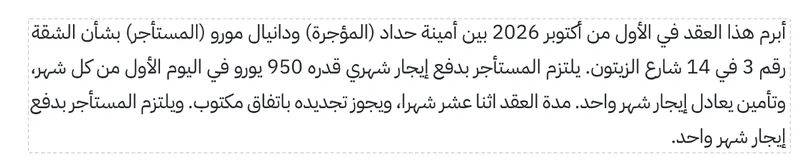
We used a sample lease with an Arabic paragraph and invented names, address and amounts. We opened it in the Arabic PDF editor with no sign-in, chose Edit text, and added a sentence at the end of the Arabic paragraph.

After we clicked Done, the message "All changes applied" appeared. The letters stayed joined, the line stayed right to left, and nothing else on the page changed.
For the steps in detail, see Edit PDF text. If you need the file in Word, see the PDF to Word tool.
GenPDF features and limitations
- No digital-certificate signature. GenPDF's signature is a simple electronic signature with an audit page, not a qualified one.
- Browser-based web app. GenPDF does not provide a separate native desktop or mobile program.
- Fewer tools. There is no PDF to PowerPoint or Excel, and no PDF/A.
- A 25 MB limit on the file you open for editing.
- Daily limits on the free plan. 3 edited PDFs, 3 signed and 2 Word exports a day. They are on the pricing page.
- Page content does not reflow automatically. Longer text may overlap nearby content. Check the page layout after editing.
- Document design. GenPDF can add text, images and shapes, but it is not a template-based design platform like Canva.
For privacy, see the security page.
How this comparison was written
We tested GenPDF on 15 October 2026 on its production build, in Chromium. On the same day we read the pages of the other tools linked above. We uploaded no file to any of them and took no screenshots of their interfaces. An AI tool helped draft the text. If a fact has changed on one of the tools' pages, write to us from the contact page and we will correct it.
Frequently asked questions
Which free PDF editor can change existing Arabic text?
There is no single best editor for every job, so it depends on what you need to do. For changing existing Arabic text without the letters splitting apart, we tested GenPDF ourselves and the letters stayed joined. For signing with a digital certificate Adobe Acrobat is the better fit, and for designing a new file Canva is. The tables above give what each tool's own page says, with a link.
Does iLovePDF edit Arabic text?
On its Arabic Edit PDF page, in a notice about the content editor, iLovePDF says the editor does not currently support right-to-left languages and that changes may not apply correctly to such a document. We did not test iLovePDF ourselves, so try your file before you rely on it.
Does Smallpdf edit existing text for free?
No, according to its Edit PDF page. The page says a free account can add text, images, highlights and drawings, and that direct text editing needs a Pro subscription, with a 7-day free trial.
When is Adobe Acrobat the better choice?
When you need a signature based on a digital certificate, when your organisation standardises on Acrobat, or when you want a desktop program. GenPDF runs in the browser and its signature is a simple electronic signature, not a certificate-based one.
Is there a free Arabic PDF editor I can download?
GenPDF needs no separate installer: its web app runs in your browser, on a computer or a phone, with no account. If you want an installed program, Adobe's pages describe Acrobat on the desktop. We did not test any downloadable editor for this article.
Is my file uploaded when I edit it?
It depends on the tool. In GenPDF the editing happens in your browser and only what you allow is sent to our server, such as the image of a scanned page to be read. PDF24 says on its page that files are deleted from its server after one hour. For the other tools, read the privacy policy before you upload a sensitive file.
How did you test these tools?
We tested GenPDF only, on a sample lease with invented names, on 15 October 2026. For the other tools we copied what their own pages say on the same day, and each fact has a link to its source. We uploaded no file to a competitor's website.


