
Fix separated Arabic letters when editing a PDF
Arabic letters split or words reverse after a PDF edit? Identify shaping, direction and font issues, then follow the editing steps and check the result.

In this article
- Identify the symptom first
- Why the letters split or reverse
- An Arabic letter changes shape with its neighbours
- Arabic lines run right to left
- Stored text may differ from the visible reading order
- The embedded font may lack the letter
- Edit Arabic text in GenPDF and check the result
- 1. Open the file
- 2. Click the Arabic line and type
- 3. Click Done, then download
- What if the font lacks the letter I type?
- Special cases
- Scanned pages, font changes and download limits
- Frequently asked questions
Separated Arabic letters and reversed words are different symptoms. They can appear when a PDF editor mishandles letter shaping, text direction or the font embedded in the file. This guide explains how to identify the cause and use GenPDF’s Arabic PDF editor, then check the edited document.
Identify the symptom first
- Separate letters on the page: check Arabic shaping and the selected font.
- Reversed words or misplaced numbers: check text direction and compare the saved result.
- The page looks right, but copied text is wrong: use the text-copying guide; extraction and visible rendering are different problems.
Why the letters split or reverse
The cause may be in the editor, the font or the text stored in the PDF. These four issues can occur together.
An Arabic letter changes shape with its neighbours
Most Arabic letters have four forms: stand-alone, initial, medial and final. The ع in عقد ("contract") is not drawn the same way as the one in معقول. An editor that writes letters one by one without picking the right form shows "ع ق د": separate letters with nothing joining them.
Arabic lines run right to left
Numbers and Latin words keep their own direction inside an Arabic line, but everything else flows from the right. If an editor lays the letters out left to right, the word comes out as its mirror image: دقع instead of عقد.
Stored text may differ from the visible reading order
A PDF does not always store words in reading order. It stores drawn shapes at their positions. That is why some Arabic PDFs give you reversed or meaningless text when you copy them, and why they are hard to edit in an editor that does not understand this way of storing text.
The embedded font may lack the letter
The font inside a PDF usually holds only the letters that were already used in it. If you type a letter it lacks, it shows up as an empty box or in a different font.
Edit Arabic text in GenPDF and check the result
GenPDF shapes every word the way Arabic is written: letters take their joined forms, the line is set right to left, and numbers and Latin words keep their direction. Editing happens in your browser, so the PDF is not uploaded to change its words. The screenshots use the sample GenPDF offers to people with no file at hand: a lease whose names, address and amounts are made up.
1. Open the file
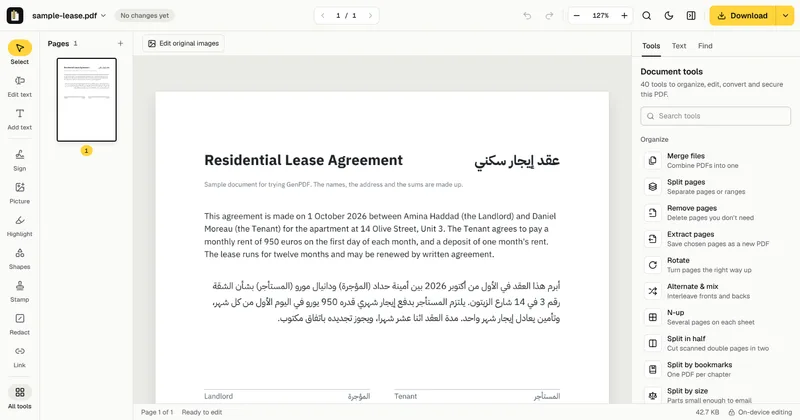
Go to the Arabic PDF editor and choose your file, or click "Try a sample" to try it first. The file opens in the editor, and its pages show as thumbnails in a side panel.
2. Click the Arabic line and type
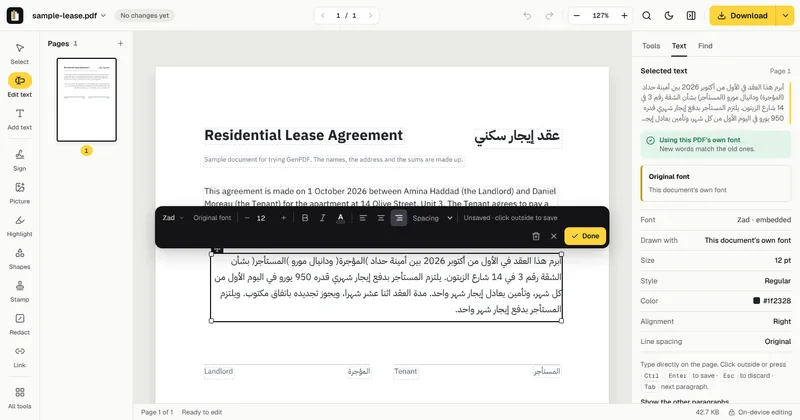
Choose "Edit text" in the toolbar, then click the Arabic paragraph. A frame appears around it, with the font controls above. Type as you would in any program: the letters join. The side panel says GenPDF is using the PDF's own font, so the new words look like the old ones. In the example we added a sentence after the paragraph's last line.
3. Click Done, then download
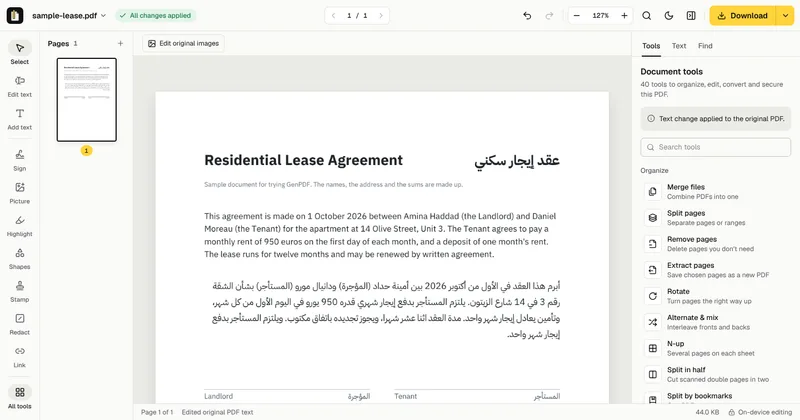
Click "Done", or click outside the paragraph, and "All changes applied" appears. Then click "Download". The new words are stored as Arabic text, rather than a picture. Search and copy results can differ between PDF readers; check the pasted text if you need to reuse it. The page looks like the screenshot below: joined letters, the added sentence in its place in the paragraph, and everything you did not touch left as it was. If you do not like the result, the "Undo" button is at the top of the editor.
What if the font lacks the letter I type?
The font inside a PDF usually holds only the letters already used. If you type one it lacks, GenPDF draws it in a matching Arabic font and tells you which one. If the file uses a decorative font it does not contain, GenPDF picks the closest one and shows its name before you save. Check that name before downloading if the look of the font matters to you.
Special cases
- A scanned file: a scanned page is an image with no text. GenPDF reads it first, with your agreement: the page image is sent to our server and deleted when the text comes back, and then you edit the lines like typed text. To get the text alone, use OCR for PDF.
- Arabic and English in one line: each part follows its own direction, and numbers and Latin words stay in place.
- Adding text instead of changing what is there: add text to a PDF writes anywhere on the page.
- Getting a Word file: see PDF to Word, which sets Arabic paragraphs right to left. The steps are in how to convert an Arabic PDF to Word.
- Text that turns into symbols when you copy it: see copying Arabic text from a PDF.
Scanned pages, font changes and download limits
Reading a scanned page works best on clear, straight pages, and handwriting is not reliable. For the free plan's download limits and the plans without limits, see pricing. To compare GenPDF with other editors, see PDF editors compared for Arabic.
Frequently asked questions
Why are Arabic letters separated or reversed after I edit a PDF?
Separate letters can result from missing Arabic shaping, while reversed words can indicate a text-direction problem. An incomplete font can cause a different display issue. GenPDF supports Arabic shaping and right-to-left text; check the saved paragraph, especially if a replacement font is used.
Can I edit a scanned Arabic document?
Yes, once you agree to have it read. The page image is sent to our server to be read and then deleted, after which you edit the lines like typed text. Your words are written in a standard font, because a scanned page contains no font.
Can I mix Arabic, numbers and English in one line?
Yes. Numbers and Latin words keep their own direction inside the Arabic line, as in a document written in Word.
Is editing an Arabic PDF free?
Yes, with no account. Editing is free, and the free plan lets you download 3 edited PDFs a day; Pro and the 7-day pass have no limit.


