
Copy Arabic text from a PDF: fix symbols and word order
Getting symbols or reversed Arabic words when copying a PDF? Identify encoding or scan issues and choose text recovery, export or OCR.

In this article
If Arabic looks correct in a PDF but turns into symbols when pasted, its text encoding may be incomplete. If the page is an image without selectable text, it needs OCR. GenPDF’s Arabic PDF editor can recover text from certain older fonts; this guide explains that case and how to export text when ordinary copying fails.
Choose a fix by symptom
- Correct appearance, symbols when pasted: try recovery for the supported older font encoding.
- Correct letters, reversed word order: export to text or Word and check the reading order.
- No selectable words: the page may be an image or outlined lettering; use OCR if there is no extractable text.
- Copying disabled by file protection: you need the password. Text recovery does not remove that protection.
Why Arabic comes out as symbols
A PDF can display letters correctly while lacking a reliable mapping from their visible shapes to text characters. That mapping matters when you copy or search the text. For a program to know which letter a drawing stands for, the file needs a table that maps each drawing to a Unicode character. That table is called ToUnicode. When it is missing or incomplete, the reader returns what it finds: symbols, glyph names or missing letters.
Arabic suffers more than most scripts because a letter has several shapes depending on its place in the word, and each shape is a separate drawing. The Unicode Standard, chapter 9 describes these shapes.
We built a test file the way some print-to-PDF programs used to write Arabic: a one-byte font whose letters are named like afii62780, with no useful ToUnicode table. The page looks right. We extracted its text with four programs, before opening it in GenPDF and after downloading it from GenPDF:
| Program | Original file | File downloaded from GenPDF |
|---|---|---|
| Poppler (the pdftotext tool) | control characters instead of letters | correct text, in order |
| PDF.js (the viewer library in Firefox) | missing letters | correct text, in order |
| pypdf | glyph names such as afii62780 | correct text, in order |
| PDFium (Chrome's engine) | control characters instead of letters | correct letters, but the words of a line in reverse order |
An example from the test: PDF.js returned the line "المؤجر شركة النور للعقارات" from the original as "ار رات ا".
The reversed word order in PDFium was not limited to the repaired file. PDFium also returned the words of the Arabic lines in reverse order for the healthy sample lease that GenPDF provides. If you paste text and find the words reversed, use the export in the section after the next one.
How to recover the text in GenPDF
1. Open the file
Open the file in GenPDF. If its font is of the kind GenPDF knows how to repair, this message appears and the text becomes readable, searchable and editable. The repair runs in your browser and the file is not uploaded.
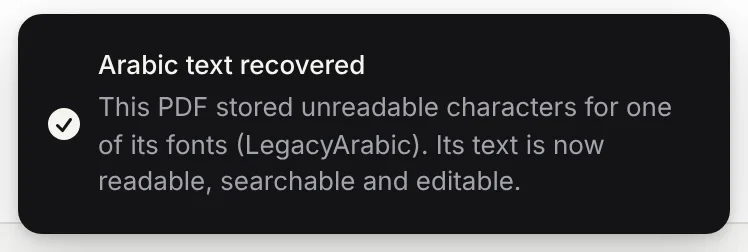
The case is specific: one-byte fonts whose Arabic letters are named after their drawings. It shows up in files printed to PDF by older programs on Windows. GenPDF does not repair every damaged file, and the message does not appear when it finds nothing to repair.
2. Check the Text tab
Choose Edit text, then open the Text tab in the side panel. It lists the "Paragraphs on this page" as readable text. If you see the words correctly here, the text has been recovered.
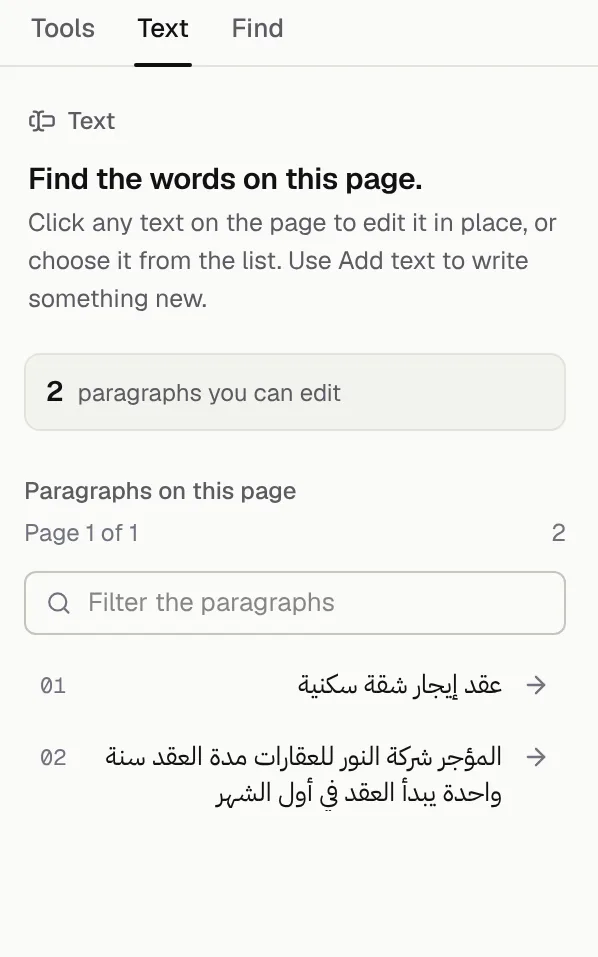
3. Download the file
Click Download. The new file carries a correct ToUnicode table, so other PDF programs read it, as in the table above. Use the downloaded copy after checking the extracted text, and keep the original for comparison.
Export all the text at once
To get all the text without copying by hand, open All tools and choose PDF to text, then click Download text. You get a .txt file with the text in reading order. In our test all four lines came out right and in the order the page is read, even where PDFium reverses the order of words.
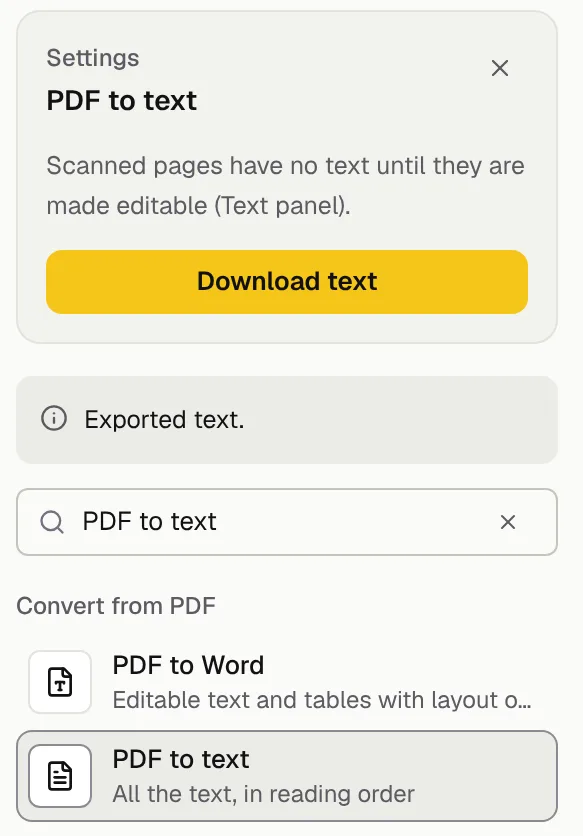
The file separates pages with a line such as "--- Page 2 ---". The export counts as one of the downloads from the other tools: 10 a day on the free plan. If you want an editable file instead of raw text, read how to convert an Arabic PDF to Word or use the PDF to Word tool.
If the page is a scanned picture
Try selecting a word or extracting the text. If there is no extractable text, the page may be an image that needs OCR. Some scanned pages already include a text layer; appearance alone is not enough to tell.
When you open such a file and choose Edit text, GenPDF asks first:
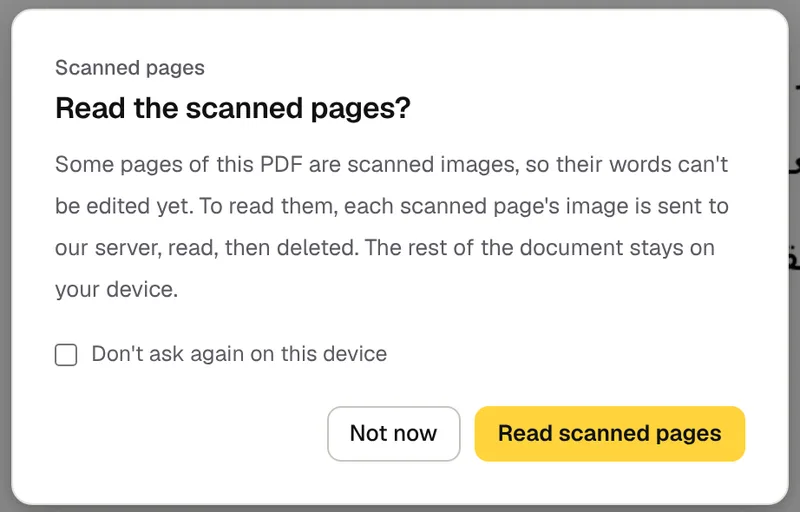
The image of each scanned page is sent to our server, read and deleted, and the rest of the document stays on your device. After reading, the lines are written into the file as invisible text over the picture, so the file can be searched and copied. For details, see OCR PDF. To change the words themselves, see editing a scanned PDF.
The free plan reads 5 scanned pages a day and a paid plan reads 100. All plans are on the pricing page.
Recovery limits and reader differences
- Other damaged files. GenPDF repairs only the case described above. If the "Arabic text recovered" message does not appear and the text is still symbols, try OCR.
- Letters drawn as outlines. Some files draw letters as shapes, not text. They are treated as images and need OCR.
- Handwriting and poor scans. Reading them is not reliable.
- Text you edited in GenPDF. It is written as real text, not as a picture. In our test, though, PDF.js ran together the words of the edited paragraph in the sample file without spaces, while Poppler and PDFium read them with spaces. If you will copy an edited paragraph from Firefox, check the spaces after pasting.
- Programs we did not test. We did not try Adobe Acrobat Reader. If your case differs, check the pasted text before you rely on it.
If your problem is that letters split or flip when you edit the file rather than when you copy it, read why Arabic letters break when editing a PDF.
How this guide was written
We ran the tests on 15 October 2026 on a production build of GenPDF in Chromium, with test files we made for the purpose whose names and contents are invented. An AI tool helped draft the text. We did not run the scanned-page reading step in the test because the reading engine is not installed in our test environment, so what we say about it comes from the editor's own message and the project's automated tests.
Frequently asked questions
Why does Arabic text turn into symbols or reversed letters when I copy it from a PDF?
The mapping from visible letter shapes to text characters may be missing or incomplete, including the ToUnicode table. A PDF reader may also extract words in a different order. Try recovery for supported fonts or export to text or Word, then compare the result with the page.
Can I copy text from a scanned PDF?
Yes, once it has been read with OCR. A scanned page is a picture with no text in it, so GenPDF reads it after you agree. The image of each page is sent to our server, read and deleted. The free plan reads 5 scanned pages a day and a paid plan reads 100. Handwriting is not reliable.
How can I tell whether a PDF holds text or only an image?
Try selecting one word and inspect the Text tab in GenPDF. If there is no selectable text, the page may be an image or outlined lettering. Some scans already have an OCR text layer, so appearance alone is not enough to tell. File protection can also restrict copying.
How do I copy Arabic text from a PDF to Word?
Choose Save as Word under Download options to get a .docx file, or use the PDF to text tool to download a .txt file with all the text in reading order. If the file is scanned, read its pages first. The free plan includes 2 Word exports a day, up to 20 pages each.
Is my file uploaded when I recover or copy the text?
Not in the usual case. Recovering and exporting the text happen in your browser. The one exception is reading a scanned page, which happens only after you agree.


