
Adobe Acrobat alternative for Arabic PDF editing
Need an Adobe Acrobat alternative for Arabic PDFs? Compare text editing, forms, signatures and free limits, plus when Acrobat’s advanced tools matter.

In this article
- Choose an Acrobat alternative by task
- What does Adobe say about Arabic?
- How to do the usual Acrobat jobs in GenPDF
- 1. Open the file
- 2. Edit the text
- 3. Sign the file
- 4. Download the file
- When Acrobat stays the better choice
- GenPDF limits to check before switching
- How this guide was written
- Frequently asked questions
You can use GenPDF as an Adobe Acrobat alternative for editing existing Arabic text, filling forms and adding a signature in your browser. The free plan has daily limits. This guide compares those tasks with Adobe’s documented features so you can decide whether you need a browser editor or Acrobat’s desktop and certificate-signing tools.
Facts checked on 15 October 2026. Next check: 15 January 2027. For a wider comparison of tools, read PDF editors compared for Arabic.
Choose an Acrobat alternative by task
Editing existing text, adding a signature and filling a form are different tasks. Start with the row that matches your document.
| Job | GenPDF | Adobe Acrobat (according to Adobe's pages) |
|---|---|---|
| Edit existing Arabic text | Yes. We tested it, and it needs no account. | Adobe's language support page says Acrobat supports Arabic and Hebrew on Windows. We found no mention of editing existing Arabic text in the body of a page. |
| Edit existing text with no subscription | Yes, within daily limits. | Adobe's free editor page, in its US version, says the free version does not edit existing text. The pages differ by country. |
| A simple signature (draw or type) | Yes, and you can request signatures from others. | Adobe's help page says a free Adobe account can fill, sign and share, and that advanced tools have a limit that resets after 30 days. |
| A signature with a digital certificate | No | Adobe's help pages describe a Use a certificate tool for signing or certifying a document with a digital ID. |
| A desktop program | No. It runs in the browser only. | Yes: Adobe's help pages describe Acrobat on the desktop. |
| Price | Pro at $79 a year, and a 7-day pass at $4.99. See pricing. | We print no price, because it differs by country and plan. See Adobe's pricing page. |
Adobe's pages did not open from our test environment, so we read excerpts of its official pages. Read the linked page yourself before you rely on a condition or a figure.
What does Adobe say about Arabic?
The language support page linked above says Acrobat supports Arabic and Hebrew on Windows. It describes the right-to-left options, which are paragraph direction, digit shapes and ligatures, and says they apply to form fields, signatures and text-box comments. The page does not say that editing existing Arabic text fails, and it does not say it works. If this is your main job, test your file in an Acrobat Pro trial if Adobe offers one in your country (check its length on Adobe's page), and compare the result with what you get in the Arabic PDF editor. The checks to run in any editor are in why Arabic letters break when editing a PDF.
How to do the usual Acrobat jobs in GenPDF
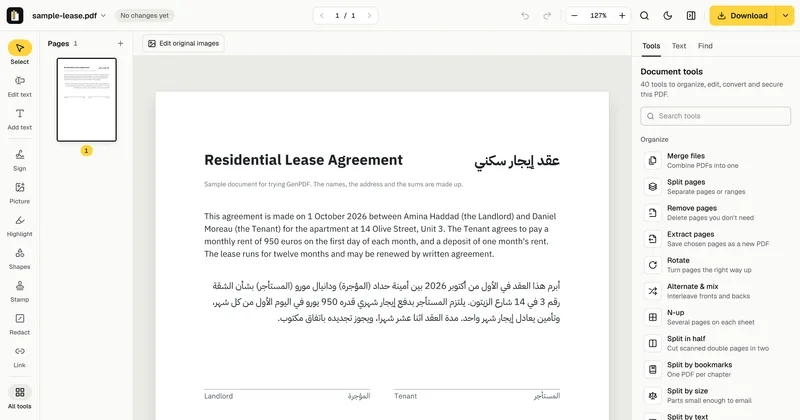
We used a sample lease with invented names and amounts.
1. Open the file
Open your file in GenPDF, or click Try a sample. The editor does not ask you to sign in. The editing happens in your browser, and On-device editing shows at the bottom of the screen.
2. Edit the text
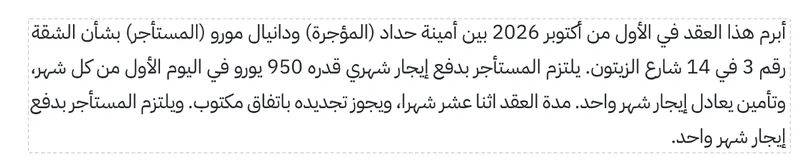
Choose Edit text, click the paragraph you want to change and type. Click Done and the message All changes applied appears. We added a sentence at the end of the Arabic paragraph: the letters stayed joined and the line stayed right to left. The details of this step are in Edit PDF text.
3. Sign the file
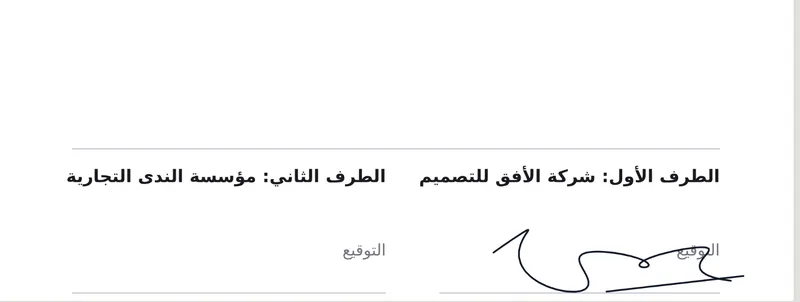
Choose Sign in the side toolbar, draw, type or upload your signature, then place it on the signature line. If another party must sign too, the Sign PDF tool can send them a signature request.
4. Download the file
Click Download. The free plan lets you download 3 edited PDFs and 3 signed PDFs a day. If you need more, see pricing.
When Acrobat stays the better choice
- A digital-certificate signature. GenPDF supports simple electronic signatures. An audit page is included when a signature request is completed. It is not a qualified signature and not certificate-based. If your contract requires one, use a tool that provides it.
- An organisation that standardises on Acrobat. If your employer requires Acrobat or manages its licences, check your workplace requirements before switching tools.
- Permanent desktop work. GenPDF is a browser-based web app, rather than a separate native desktop or mobile program.
Where a browser editor is enough, you can do without the subscription. If you are comparing other tools instead of Acrobat, read the iLovePDF alternative for editing Arabic text.
GenPDF limits to check before switching
- No digital-certificate signature and no desktop program.
- Daily limits. The free plan includes 3 edited PDFs and 3 signed PDFs a day.
- Page content does not reflow automatically. Longer text may overlap nearby content. Check the page layout after editing.
- Scanned files. They are read first, on our server, after you agree, and they count toward the free plan's 5 scanned pages a day. See editing a scanned PDF.
How this guide was written
We tested GenPDF on 15 October 2026 on its production build, in Chromium, on a sample lease. We did not test Adobe Acrobat ourselves. We relied on excerpts of the Adobe pages linked above, because its pages did not open from our test environment, and that is why we print no price. An AI tool helped draft the text. The Arabic version of this guide was written first.
Frequently asked questions
What is a free alternative to Adobe Acrobat for editing PDFs?
GenPDF edits the existing text of a PDF, signs it and fills its forms in the browser, with no account and nothing to install, within daily limits on the free plan. It does not cover everything Acrobat does, such as signing with a digital certificate.
Can I edit existing text in a PDF without Acrobat Pro?
Yes. In GenPDF you choose Edit text, click the paragraph and type. Adobe's free online editor page, in its US version, says the free version does not edit existing text. The wording of Adobe's pages differs by country.
Does Acrobat edit Arabic text?
Adobe's language support page says Acrobat supports Arabic and Hebrew on Windows, and that its right-to-left options affect form fields, signatures and text-box comments. We found no mention there of editing existing Arabic text in the body of a page. Test your own file during the trial before you subscribe.
Do I need Acrobat to sign a PDF?
Not for a simple signature. GenPDF lets you draw, type or upload your signature, place it on the file and send a signature request to others. For signing with a digital certificate, Adobe describes the tools in Acrobat and GenPDF does not offer them.
Does GenPDF work without a subscription and without installing anything?
Yes. It runs in the browser on a computer or a phone, and it opens, edits and downloads the file with no account. A subscription is optional, for people who need higher daily limits.


