
Chat with a PDF: check answers against the source pages
Ask useful questions about a PDF and verify the answers. Check quotations, page references, calculations and information the document does not contain.

In this article
- Ask a question the document can answer
- Check extraction and page selection first
- Verify each part of the answer
- Treat calculations as a separate task
- Test the missing-information case
- Separate translation from answering
- A worked example with an invented lease
- Summary versus question
- Check it yourself
- Limits to keep in mind
- Frequently asked questions
Asking a PDF a question can save you from searching every page. The result is useful only if you can trace the answer back to the document. A citation is the start of that check, not its conclusion.
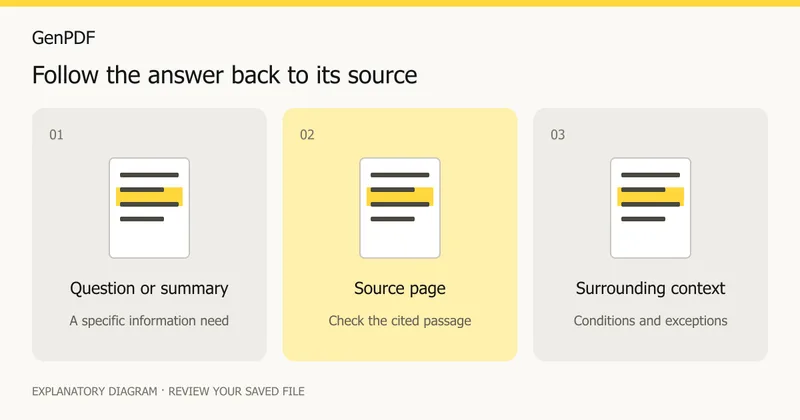
When you chat with a PDF, ask a focused question, inspect the cited passage and separate the document's statements from the tool's calculations or interpretation. Keep the original open beside the answer.
Ask a question the document can answer
“What does this report say?” invites a broad response. “Which delivery date is stated for phase two, and on which page?” is easier to verify. Include the section or period when the file covers several projects or years.
Useful question patterns include:
- What deadline is stated for this task? Quote the relevant passage.
- Which assumptions support this forecast?
- Does the document specify a cancellation period? If it does not, say so.
- Which figures were used for this total, and where are they shown?
These are suggested prompts, not examples of tested answers from a real customer's document.
Check extraction and page selection first
In the PDF editor, the AI panel appears when the feature is enabled. Select the relevant pages and read the consent notice before processing their text. A question about an appendix cannot be answered reliably if that appendix was excluded.
Try copying a paragraph from the source. If the text is missing or scrambled, fix extraction before asking detailed questions. OCR and scanned PDF editing explains why a visible page and usable extracted text are different things.
Verify each part of the answer
| Answer contains | Check in the source |
|---|---|
| A quotation | The words match and have not lost a qualification |
| A date | The date refers to the same event or stage |
| A total | The component values, units and arithmetic |
| A recommendation | Whether it is stated by the author or inferred |
| A page reference | The cited page actually supports the claim |
Read a few sentences around the quote. A sentence describing a rejected proposal can be misread as the final decision when its context is omitted. Printed page numbers may also differ from the PDF reader's page positions.
Treat calculations as a separate task
If the answer adds several amounts, verify the inputs and calculation independently. For a synthetic example, three entries of 125 total 375—but that is useful only if those entries belong to the requested category and period. A correct sum of the wrong rows is still the wrong answer.
For tables that extract poorly, consult the table-formatting guide. Do not infer that a neat-looking table has been read in the right order.
Test the missing-information case
Ask one question whose answer you know is absent from a sample document. A useful response should identify the gap rather than invent a policy, contact name or deadline. This does not prove that every future answer will be reliable; it helps you understand the review the workflow needs.
Before sharing an answer, attach enough context for the recipient to find the passage. If you need to reorganize verified material, a flowing Word export may help, while the original remains the source of record.
Separate translation from answering
If the source is in a language you do not read confidently, an answer in your language can help you navigate it, but it is not a complete translated document. Use selected-page PDF translation when the passage itself must be reviewed or shared in another language.
A useful follow-up is: “Which sentence directly supports that answer, and what conditions appear beside it?” If the response changes, compare both versions with the source before retaining either. Keep a short record of the question, verified answer and page position so someone else can repeat the check.
A worked example with an invented lease
Suppose you hold a 12-page document called "Harbor Street Office Lease" from an invented landlord, Northgate Property Ltd, at example.com. You want to know when notice is due. A focused question is: "What notice period does the tenant need to give to end the lease, and where is it written?"
A good reply names a period and a page. You then do three things:
- Open the cited page and find the sentence. Does it say "tenant" or "either party"?
- Read the sentence before and after. A clause that starts "Unless clause 9 applies" changes the answer.
- Search the whole file for "notice". A second clause on another page may set a different period for early termination.
Step 3 is the one people skip. A citation shows where an answer came from; it does not show that nothing else in the file bears on the question. All names and clauses in this example are invented.
Summary versus question
The AI panel offers a summary (an overview with up to 12 points, each tied to pages) and a question box that answers with a page and a quotation. They suit different moments. Use the summary to decide whether a long file is worth reading and where to look. Use a question when you already know what you need.
A summary compresses, and compression drops conditions. Treat each point as a pointer to a page, not as a replacement for it.
Check it yourself
You can test any answer without special tools:
- Open the cited page in the editor or in a second reader and search for two or three words from the quote.
- Copy the quoted sentence from the PDF and paste it next to the answer. They should match word for word.
- Ask the same question with a slightly different wording. If the page or the figure changes, read both pages.
- Ask about something you know is not in the file and confirm that the reply says so.
- For a figure, recompute it from the source rows with a calculator.
Limits to keep in mind
- Only the pages you choose are read. A question about a clause on page 11 cannot be answered from pages 1 to 5.
- A scanned page has no text for AI until the scan reader has read it (choose Edit text, then Read scanned pages; the AI panel never starts that reading itself). After that, questions are answered from what the reader read, which can misread words and numbers: the panel says so under the pages concerned, so check figures against the page image. Pages the panel lists as having no text yet have not been read.
- Other text that does not extract, such as words drawn as outlines, cannot be read at all.
- Answers can be wrong or incomplete even when they look confident. A page reference can point to a nearby page.
- The panel appears only where the service has AI switched on, and it asks for your consent before any text is processed.
- For legal, medical or financial decisions, read the source passage yourself and ask a qualified person.
Guide prepared on 16 October 2026 from the project's documented question-and-answer workflow, and updated on 23 October 2026 for scanned pages (checked against the code and its tests, not on a real scan). No new provider request or accuracy benchmark was performed. The prompts and numbers are illustrative. Written with AI assistance.
Frequently asked questions
Does a page citation guarantee a correct answer?
No. Open the page and check whether the quoted passage supports the claim, including its conditions and scope.
What if the answer is not in the PDF?
Treat that as missing information. Do not accept a plausible answer unless the source supports it, and check whether you selected the relevant pages.
Is asking a PDF a question free?
Where AI is switched on, free use needs a confirmed account and has a daily allowance of 20 credits. Paid plans have a larger daily allowance. Check the pricing page for the current figures.
Which parts of my PDF are sent when I ask a question?
Only the text of the pages you chose, and only after you agree in the consent dialog. The PDF file and its pictures are not sent.


