
PDF to Word: text boxes or editable paragraphs?
Converted PDFs can be difficult to rewrite in Word. Learn when to keep positioned text, choose flowing paragraphs or use page images instead.

In this article
- Editable text is not the same as flowing text
- GenPDF's three export choices
- A two-minute choice test
- Export one representative page
- Add a sentence in the middle
- Make one structural change
- Worked example: a three-page newsletter
- Check it yourself
- Limits
- Avoid fixing flow with spaces and blank lines
- When the original source is the better option
- Frequently asked questions
You add a sentence to a converted PDF and the next paragraph does not move. The words are editable, but the document still behaves like a fixed page. That usually means the conversion prioritised position over flow.
Before spending time removing boxes, decide what you need from PDF to Word: a few corrections in the same places, a document you can rewrite, or a visual copy inside a DOCX file. Those are different outputs.
Editable text is not the same as flowing text
A paragraph can be editable inside a frame. That preserves its approximate position, but adding content may require you to adjust space around it. A flowing paragraph participates in the document's reading sequence and can push later content down.
The Microsoft explanation of PDF conversion describes why software must infer document structure from a fixed page. A conversion cannot always preserve every position and make every paragraph behave as though the document had originally been written in Word.
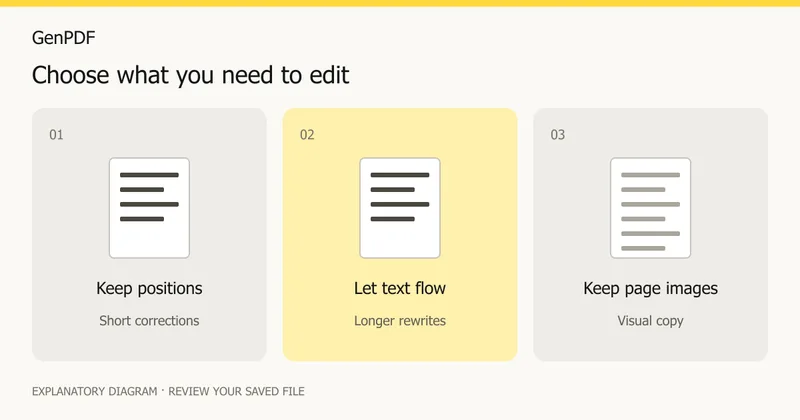
GenPDF's three export choices
| Mode | Best starting point for | What to watch |
|---|---|---|
| Keep layout, editable | Correcting short phrases while retaining placement | Longer text may need layout adjustments |
| Flowing text | Rewriting sections and reusing content | Line breaks and pagination can change |
| Page images | Keeping a visual copy in Word | Words inside the images cannot be edited |
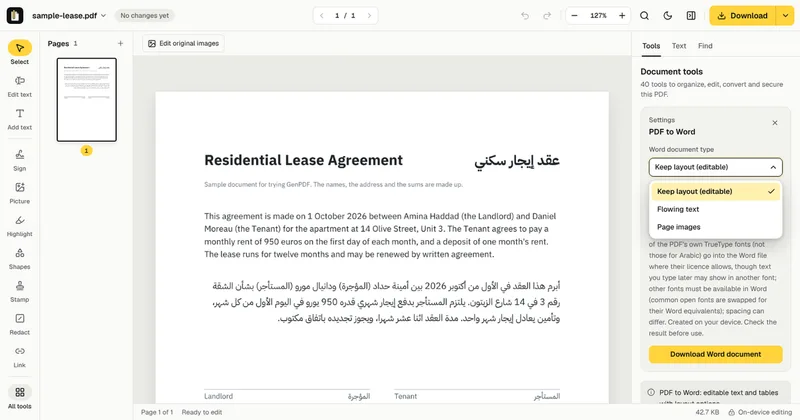
A two-minute choice test
Export one representative page
Use a page with the kinds of content you actually need: a heading, two paragraphs, a table or an image. A plain title page will not reveal how a complex report behaves. If necessary, extract the relevant page from a copy first.
Add a sentence in the middle
Open the DOCX in your usual word processor. Add a short sentence to the first paragraph. Observe whether the following paragraph moves, stays fixed, or overlaps. Undo the test when finished. This is a recommended acceptance check, not a claim that we ran your file.
Make one structural change
If your task involves rewriting, create a paragraph break or insert a heading. If it involves a table, change one cell. A document that allows individual words to change can still be inconvenient for structural editing; compare the result with the table review checklist.
Worked example: a three-page newsletter
Consider a three-page newsletter from an invented library, Elm Street Reading Room, at example.com. It has a masthead, two columns of text, a boxed announcement and a photo with a caption.
For a correction (a changed opening time), the layout-preserving mode is quick: you edit the sentence in place and the columns stay. For next month's issue, where you will rewrite half the text and add a section, flowing text is the better start because the paragraphs move as you type. For an archive copy that should look like the page, page images avoid any reflow, but you cannot edit the words in them.
Pick by what will happen next month, not by what the file looks like today. The names here are invented.
Check it yourself
- Click a paragraph and look at its frame. Selection handles around a box mean it is positioned.
- Add a line of text and see whether the following paragraphs move.
- Open the Navigation pane in Word (View, Navigation) and see whether headings were detected.
- Turn on the formatting marks to see paragraph ends and manual line breaks.
- Open the file in a second word processor and see whether the layout survives.
Limits
- No export mode both keeps the exact positions and flows like a native Word file. You choose which matters more.
- Page images cannot be edited as words.
- Columns, footnotes, headers and floating images may need manual correction.
- The free plan allows 2 Word exports a day, up to 20 pages each.
For right-to-left text, see converting an Arabic PDF to Word.
Avoid fixing flow with spaces and blank lines
Repeated spaces may make one line look right on your screen, but they can shift when a font changes or someone opens the file in another application. First choose the appropriate output mode. Then use paragraph settings, cell widths and page breaks where needed.
If the whole document changes appearance, check whether its fonts are available. The same-font editing guide explains the difference between original and fallback fonts; Word can also substitute unavailable fonts after conversion.
When the original source is the better option
For a long document with frequent revisions, ask for its original DOCX or publishing file when possible. Conversion is most useful when the PDF is the source you have, but it still needs review. For a scan, begin with OCR versus editing before expecting flowing text.
Prepared on 16 October 2026 from GenPDF's export modes and current implementation. The diagrams explain behaviour; they are not screenshots of a successful export. No new Word application benchmark was performed for this article. Written with AI assistance.
Frequently asked questions
Why does my converted PDF contain text boxes or frames?
Positioned containers help preserve the PDF's page layout. They can be useful for small edits but less convenient when you want the whole document to reflow.
Does editable mean the document will reflow like a normal Word file?
No. Text can be editable while remaining in positioned frames. Choose a flowing-text mode if you intend to add paragraphs or reorganize sections.
Will Page images let me change the words?
No. That mode puts pictures of the PDF pages into Word. It preserves their visual content rather than rebuilding editable words.
Is Word export free?
The free plan includes 2 Word exports a day, up to 20 pages each. Paid plans have a higher daily allowance. The pricing page has the current figures.


